# Ad summary
This ad uses the Adobe Lightroom app to edit engagement photos. The creator discusses how she used the app to adjust exposure and saturation, apply skin tone presets, and add adaptive blur to her images to enhance them before displaying them in frames at her bedside.
# Brand positioning
The ad positions Adobe Lightroom as a user-friendly photo editing app for enhancing personal memories. It targets casual users who want to elevate their photos without requiring advanced skills or expensive software. By showcasing simple tools and instant presets, the brand presents itself as accessible and convenient, focusing on the functional benefits of quick, easy enhancements rather than appealing to professional photographers or complex editing needs. The brand appears to follow category norms for photo editing software, offering accessible and convenient photo enhancement.
# Product
Adobe Lightroom mobile app is presented as a photo-editing tool designed for enhancing core memories. The ad demonstrates easy-to-use features, including quick action tools for background adjustments, subject-specific presets for portraits with medium skin tones, adaptive blur, and scene enhancement. It emphasizes how the app allows users to adjust exposure and saturation, so that the background is softer yet bright, add drama to skin tones, and make hands and rings stand out beautifully. The app is positioned as a tool for instantly transforming photos with dramatic effects, requiring only 15 minutes to achieve frame-worthy results. By focusing on enhancing engagement photos, the ad suggests the app is ideal for capturing and refining important life moments.
# Visual style
The ad maintains a polished, commercial aesthetic, integrating UGC-style screen recordings for authenticity. It mixes quick cuts with more static shots to balance pace and clarity. The editing rhythm syncs product actions to the voiceover, creating a cohesive audio-visual experience. The pacing maintains a consistent rhythm, enhancing engagement without feeling rushed. The overall effect is a seamless blend of polished production and user-generated content, building trust and credibility.
# Hooks
Spoken: 00:00–00:06: I recently got engaged. So let me show you how I edited some of our core memories from this to this using Adobe Lightroom.
Visual: 00:00–00:01: A selfie-style shot of Female 1. The background is a blurred outdoor area and the camera is shaky. She is wearing a yellow outfit with large jhumka earrings, smiling, as she introduces the topic. / 00:01–00:03: A hand with silver nail polish is raised showing the engagement ring. The ring finger is centered. The background is blurred, with water, and greenery. / 00:03–00:06: A split screen divided by a white ripped paper visual effect. Each side has vertically stacked images of Female 1 and her partner embracing, hands with rings pinky promising, and a view of the proposal picnic set-up at night.
# Funnel stage
Middle of funnel (Consideration): Educates, compares, or shows how the product works — persuades with logic or validation
# Pain points
Core memories are not being properly showcased in photos as the colors might not be correct. Quote: "Let me show you how I edited some of our core memories from this to this using Adobe Lightroom."
# Value propositions
- “I want to adjust the exposure and reduce the saturation so that the background is softer yet bright.”
- “I picked the medium skin tone preset and just look at that instant drama.”
- “tweak the exposure a little to make our skin and rings stand out beautifully.”
- “I use the enhance scene feature to make sure that my hand stands out against that beautiful background.”
# Benefits
- Background is softer yet bright
- Instant drama to our skin tones
- Make our skin and rings stand out beautifully
- Make sure that my hand stands out against that beautiful background
# Features
- Background tool
- Adjust the exposure and reduce the saturation
- Subject tool
- Premium preset
- Medium skin tone preset
- Auto edit feature
- Adaptive blur background
- Tweak the exposure
- Enhance scene feature
# Call to action
Download the app now and explore it for yourself.
# Point of view
- Customer 100% – The ad is told from the POV of an engaged woman editing her engagement photos.
# Storyline
- 00:00–00:02 The creator, who is wearing a yellow outfit with large jhumka earrings, smiling, as she introduces the topic.
- 00:02–00:03 She then shows the engagement ring on her hand over a blurred background of water.
- 00:00–00:06 She states that she has recently gotten engaged and will show how she edited her photos using Adobe Lightroom.
- 00:03–00:06 Next, a split screen effect shows before-and-after versions of her engagement photos.
- 00:03–00:06 This transition introduces the app and its ability to transform photos from this to this.
- 00:06–00:06 Then, a screen recording shows the Adobe Lightroom interface on a phone.
- 00:06–00:07 It shows the app loading the photos and takes the audience inside the app from the perspective of a user.
- 00:07–00:14 The creator uses the background tool to adjust the background exposure and saturation in an image with her and her partner.
- 00:07–00:14 She shares her aim to make the background softer yet bright.
- 00:14–00:20 The perspective then shows the various portrait presets, she picks one that is categorized as medium skin.
- 00:14–00:20 She shares that these presets work across a wide range of photos of people with medium skin tones.
- 00:20–00:23 The creator says to look at the instant drama, conveying satisfaction with the effect.
- 00:23–00:24 The edited photo is saved.
- 00:24–00:27 The creator says that the pinky promise photo is one of her favorites.
- 00:27–00:30 The perspective shows the phone screen using auto-edit to enhance the ring photo.
- 00:27–00:34 Next, the creator shows the presets and applies a preset for medium skin.
- 00:27–00:34 She mentions that it adds that perfect bit of drama to our skin tones.
- 00:34–00:42 Then, the background is adaptively blurred and the exposure is tweaked a little to make our skin and rings stand out beautifully.
- 00:42–00:46 The app is also used on the last image that she took, minutes after he proposed.
- 00:42–00:51 The perspective then shows the phone screen using auto-edit and scene enhance features to emphasize the hand against the beautiful background.
- 00:51–00:54 Finally, the creator reveals the framed, edited photos displayed by her bedside.
- 00:54–00:59 She concludes by saying it only took 15 minutes on the Adobe Lightroom app, encouraging viewers to download and explore the app.

How Adobe Photoshop Lightroom Advertises on Meta
Updated Apr 19, 2026 · Refreshes weekly
Adobe Photoshop Lightroom runs 409 active ads on Meta, shipping ~7 new creatives per week. Their library leans on Before and After33%, Screen Recording26%, and Demo8%. Recently, Lightroom is leading with everyday moment enhancement — pets, selfies, food, race days, engagements — positioning the app as the effortless upgrade between your photo and your best photo. Quick Actions, presets, Lens Blur, Point Colour, and a Generative AI removal tool are the recurring feature hooks.
Indexed by Motion's Inspo Library.
The 20 Most Recent Adobe Photoshop Lightroom Ads on Meta

# Ad summary
This ad for Adobe Lightroom promotes its ability to enhance photos of pets. The ad features a photo of a dog on a walk, with the Adobe Lightroom logo at the top.
# Brand positioning
Adobe Lightroom is presented as a user-friendly photo editing software that helps users enhance and perfect their photos. It's positioned for everyday use, particularly for those who want to capture and improve images of their pets. The brand aims to occupy a space in the consumer's mind as a go-to tool for making photos look their best with minimal effort, fitting into a lifestyle of sharing and cherishing memories. Adobe Lightroom presents itself as accessible and relevant to both amateur and professional photographers.
# Product
Adobe Lightroom is a photo editing software designed to enhance and perfect photos. The product enables users to edit pictures. It is for anyone looking to make their photos look their best, especially pet owners wanting to capture and improve images of their furry friends. The advertisement conveys that with Adobe Lightroom, users can easily enhance their photos to show off their pets.
# Visual style
The ad has a casual, natural aesthetic, resembling a snapshot taken outdoors. The production quality appears to be mid-range, suggesting it was likely shot on a smartphone or similar device. The image has a slight color grading to enhance the vibrancy of the greens in the grass and the white color of the dog's fur. The typography is clean and simple, overlaid directly onto the image. The ad's style aligns with the platform's native behaviors, fitting seamlessly into an in-feed experience.
# Hooks
Headline: Your furry friend.
# Funnel stage
Top of funnel (Awareness)
# Pain points
None used.
# Value propositions
- Adobe Lightroom helps you take great photos of your furry friends
# Benefits
- The ad implies that the Lightroom software can help create great photos of pets
# Features
- Adobe Lightroom
# Call to action
None used.
# Social proof
- None used.
# Point of view
- Brand: The brand promotes the product. This can be seen with the Adobe Lightroom logo at the top of the ad.
- Customer: The photo of the dog captures a moment with their pet, which is what a customer would experience.
# Storyline
- The ad opens with a close-up photo of a dog in a park, establishing the scene and subject. This is from the perspective of the photographer, who is capturing a moment with their pet.
- The Adobe Lightroom logo is displayed at the top, associating the brand with the image and implying that the photo was enhanced using the software. This is from the brand's perspective, promoting the software's capabilities.
- The text "Your furry friend." appears, emphasizing the ad's focus on pet owners and suggesting that Lightroom can help capture the best images of their pets. This is from the brand's perspective, directly addressing pet owners.

# Ad summary
This image ad promotes Adobe Photoshop Lightroom with a photograph of a table full of desserts.
# Brand positioning
Adobe Photoshop Lightroom positions itself as a tool to enhance the quality of your photographs. While the ad doesn't explicitly state values, the brand aligns with creativity, professionalism, and a user-friendly approach to photo editing. It pushes against the notion that professional photo editing is only for experts, presenting itself as an accessible tool for anyone looking to improve their images. The brand positioning blends both functional and emotional elements, promising not just improved photo quality but also a sense of accomplishment and satisfaction in one's creative endeavors.
# Product
Adobe Photoshop Lightroom is presented as a photo editing software designed to enhance the visual appeal of images, specifically in the context of food photography. The ad showcases the product's ability to transform ordinary food photos into something "delicious-looking," suggesting that it is a user-friendly tool for achieving professional results. The intended audience appears to be food enthusiasts, social media users, or anyone who wants to elevate the quality of their food-related posts. The ad implies that Lightroom addresses the pain point of capturing mouthwatering food photos, making it accessible to a broader audience. The value proposition lies in its ability to turn anyone into a capable food photographer, regardless of their skill level.
# Visual style
The ad features a highly polished, studio-shot image with a focus on visually appealing desserts, including a cake, cookies, and macarons. The image is well-lit and color-graded to enhance the colors and textures of the food. The typography is integrated using a clean, legible font. The overall visual style is designed to be eye-catching and appetizing, suitable for in-feed placement on platforms like Instagram.
# Hooks
Headline: 먹음직스러운 음식 사진 완성하기
# Funnel stage
Top of funnel (Awareness)
# Pain points
The most central frustration or problem the product is solving is the difficulty in capturing visually appealing food photos. “Complete delicious-looking food photos” clearly signals a frustration with the current state of one's food photography skills.
# Value propositions
- Adobe Photoshop Lightroom helps you complete delicious-looking food photos.
# Benefits
- Complete delicious-looking food photos
# Features
- Photo editing software
# Call to action
None used.
# Social proof
- None used.
# Point of view
- Brand: The brand's POV is consistent throughout the ad, showcasing its product as a tool for improving food photography and creating visually appealing content.
# Storyline
- The ad begins with a visually appealing tablescape of desserts, including a cake, cookies, and macarons, which is intended to immediately capture the viewer's attention and set the context. The brand is telling the story, framing food photography as an enjoyable and attainable activity.
- A close-up shot of hands arranging colorful macarons on a glass plate serves to highlight the artistry and care that goes into food styling. From the brand's POV, this emphasizes the subject matter that its product is made to enhance.
- The text overlay, "먹음직스러운 음식 사진 완성하기", which translates to "Complete delicious-looking food photos," reinforces the key message that Lightroom can help users achieve mouthwatering food photos. The brand is explicitly stating the product's ability to enhance the visual appeal of food-related content. This builds on the narrative by highlighting that Lightroom is the tool you need to complete that process.
- The inclusion of the "Adobe Photoshop Lightroom" logo at the bottom serves to explicitly identify the product being advertised and create brand recognition. The brand is telling the viewer that it is its software that is the key to their photo's success.
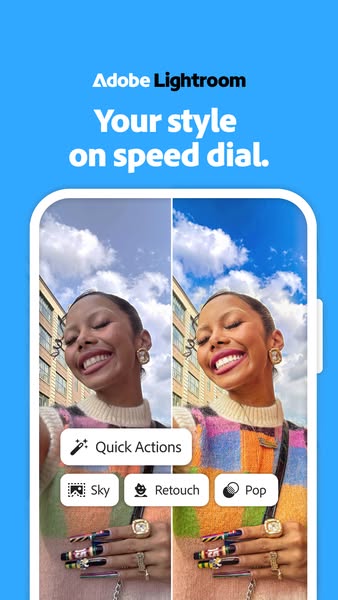
# Ad summary
This ad for Adobe Lightroom features a split screen demonstrating the app's editing capabilities. A woman is pictured twice, once with an unedited photo, and once with a more vibrant and polished photo.
# Brand positioning
Adobe Lightroom is positioned as an easy and quick way to edit photos. The brand promotes effortless, instantaneous, and high-quality photo editing that can be achieved through its advanced features and intuitive user interface. The brand seems to be pushing against the norm that quality photo editing requires a high learning curve or is time consuming to achieve.
# Product
Adobe Lightroom is a photo editing application by Adobe. It allows users to instantly edit photos with precision. The product offers "Quick Actions", including Sky, Retouch, and Pop, which is advertised as enabling users to enhance photos in moments. This product is useful for anyone who wants to easily enhance their photos.
# Visual style
The ad uses a modern and clean aesthetic. The split-screen format is common on social media platforms, specifically on TikTok. The image quality is high, giving a polished and professional feel. The color palette is bright and inviting, featuring light blues and pastel colors.
# Hooks
Headline: Your style on speed dial.
# Funnel stage
Middle of funnel (Consideration)
# Pain points
The ad addresses the pain point of editing photos to make them look their best, but it takes too long or the process is too difficult.
# Value propositions
- Edit your photo with Quick Actions for a better looking photo, fast.
- The Lightroom app will change your photos in an instant with the editing features.
# Benefits
- Your style on speed dial
# Features
- Quick Actions
- Sky
- Retouch
- Pop
# Call to action
None used.
# Social proof
- None used.
# Point of view
- Brand: The brand is speaking through the copy, promoting its value. The brand is showing its potential user base how quick and easy it is to get great looking pictures.
- Customer: The woman in the photo is the user and the one who will benefit from editing their photo with Lightroom. The photo demonstrates that they can easily transform a photo of themselves.
# Storyline
- The ad opens with the Adobe Lightroom logo and the claim, "Your style on speed dial," immediately setting the stage by emphasizing the speed and accessibility that it provides its users. The brand tells the audience about the convenience that the app will give them.
- The screen is then split between an unedited photo and an edited photo of the same woman. This is designed to show the impact of using Adobe Lightroom and how it can quickly and easily transform a photo. The woman is the audience’s point of view here, demonstrating the kind of photos they can take and immediately edit.
- A selection of Quick Actions appears, including Sky, Retouch, and Pop, showing the breadth and ease of the app's features and solidifying that Lightroom offers streamlined and intuitive photo editing. The brand is demonstrating how the product can quickly and easily transform a photo.
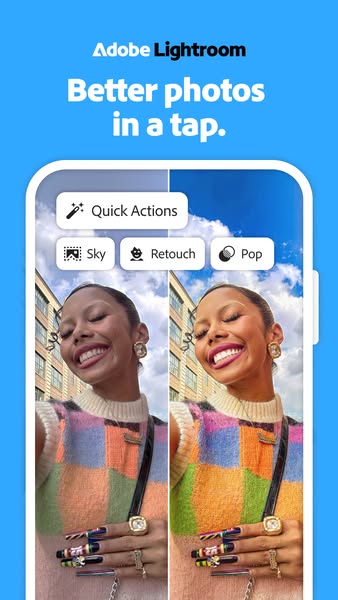
# Ad summary
This ad for Adobe Lightroom features a side-by-side comparison of a photo before and after being edited in the app. The ad highlights how a photo can be instantly improved with the app's one-tap Quick Actions and features like Sky, Retouch, and Pop.
# Brand positioning
Adobe Lightroom is presented as an accessible and user-friendly solution for anyone looking to enhance their photos quickly and easily. The brand aims to occupy the space of simple, effective photo editing accessible to all skill levels. It promotes ease of use and instant results, catering to users who want professional-looking photos without the complexity of traditional photo editing software. The brand emphasizes functional benefits with an emotional overlay of achievement through enhanced visuals.
# Product
Adobe Lightroom is presented as a mobile photo editing application designed for quick and easy photo enhancements. The product is showcased within a phone screen interface, implying its primary use on mobile devices. The ad highlights one-tap Quick Actions, and features like Sky, Retouch, and Pop, all aimed at instantly improving the look of photos with minimal effort. The product is clearly targeted towards users who want professional-looking photo edits without the complex features of desktop photo editing software. The ad addresses the barrier of complicated photo editing processes by showcasing a streamlined, user-friendly mobile app with instant results.
# Visual style
The ad utilizes a clean and simple visual style with a focus on demonstrating the product's immediate effects through a before-and-after comparison. The use of a mobile interface suggests a platform-native aesthetic, mimicking the appearance of an app in use. The lighting is bright and the colors are vibrant, emphasizing the positive impact of the photo editing features. The typography is clean and legible, ensuring scannability in a fast-scrolling feed.
# Hooks
Headline: Better photos in a tap.
# Funnel stage
Middle of funnel (Consideration)
# Pain points
The ad addresses the common frustration of wanting better-looking photos but lacking the time or skills for complex editing software.
# Value propositions
- Achieve better photos quickly and easily using one-tap Quick Actions and features like Sky, Retouch, and Pop.
# Benefits
- Better photos in a tap.
# Features
- Quick Actions
- Sky
- Retouch
- Pop
# Call to action
None used.
# Social proof
- None used.
# Point of view
- Brand: The brand voice is present in the headline, introducing the product and promising specific, quick results.
- Customer: The side-by-side image shows a customer's before and after experience using the product, demonstrating the visual impact of its features.
# Storyline
- The ad opens by presenting the Adobe Lightroom logo and the promise of "Better photos in a tap," immediately establishing the app's focus on ease of use and impactful results. This introduction, delivered from the brand’s perspective, sets the stage for demonstrating how quickly and easily the app can improve photos.
- The ad transitions to a side-by-side comparison of a photo before and after editing within the app, showcasing the app's capabilities and the visual impact of its features. The comparison, experienced from the viewer's perspective, highlights the immediate difference and encourages the belief that similar results are attainable with minimal effort.
- Finally, the ad displays various Quick Action buttons (Sky, Retouch, Pop), emphasizing the specific features available within the app. This detailed look into the app’s tools, delivered from a product-centric view, reinforces the value proposition of instant photo enhancements with just a few taps.

# Ad summary
This ad uses a split screen to show the difference between a photo before and after using Adobe Lightroom. The top half of the image shows the photo before editing, and the bottom half shows the same photo after editing with Adobe Lightroom.
# Brand positioning
Adobe Lightroom is presented as a tool that enhances photos, making them more visually appealing. The brand positions itself as a solution for improving the quality of everyday photos, suggesting that even simple snapshots can be transformed into something more professional and polished. The brand aims to occupy the space of accessible photo enhancement, offering a user-friendly way to achieve better-looking images without extensive editing knowledge. This brand pushes against the norm that photo editing is complex and time-consuming, instead promoting simplicity and ease of use.
# Product
Adobe Lightroom is presented as a photo editing application that enhances the visual appeal of photos. The ad showcases a before-and-after comparison, demonstrating how the application can transform a regular photo into a more polished and visually appealing image. The product is for anyone looking to improve their photos with minimal effort. The ad addresses the purchase barrier of complexity by showing how easily a photo can be enhanced with the application.
# Visual style
The ad has a clean and modern visual style, with a focus on showcasing the difference between the unedited and edited photos. The split-screen format is simple and effective, allowing viewers to quickly grasp the transformative power of Adobe Lightroom. The use of natural lighting and vibrant colors in the edited photo enhances the overall aesthetic appeal. The production quality appears to be high, with a polished and professional look.
# Hooks
Headline: None used
# Funnel stage
Middle of funnel (Consideration)
# Pain points
The ad addresses the pain point of photos not looking as good as they could, suggesting that regular photos can be improved with editing.
# Value propositions
- Adobe Lightroom enhances photos, transforming regular photos into more polished images.
# Benefits
- Enhances photos
- Transforms regular photos into more polished images
# Features
- Photo editing application
# Call to action
None used.
# Social proof
- None used.
# Point of view
- Brand: The entire ad is presented from the brand's perspective, showcasing the capabilities and benefits of using Adobe Lightroom for photo editing.
# Storyline
- The ad begins by showing a split screen of the same photo, with the top half representing the unedited version and the bottom half showcasing the edited version using Adobe Lightroom. This is intended to immediately highlight the transformative power of the application from the brand's perspective.
- The top half of the image is labeled "Tu foto de pícnic" (Your picnic photo), while the bottom half is labeled "Tu foto de pícnic sin los extras" (Your picnic photo without the extras), with the Adobe Lightroom logo overlaid. This is intended to show the viewer the difference between a regular photo and one enhanced with Adobe Lightroom, from the brand's perspective.
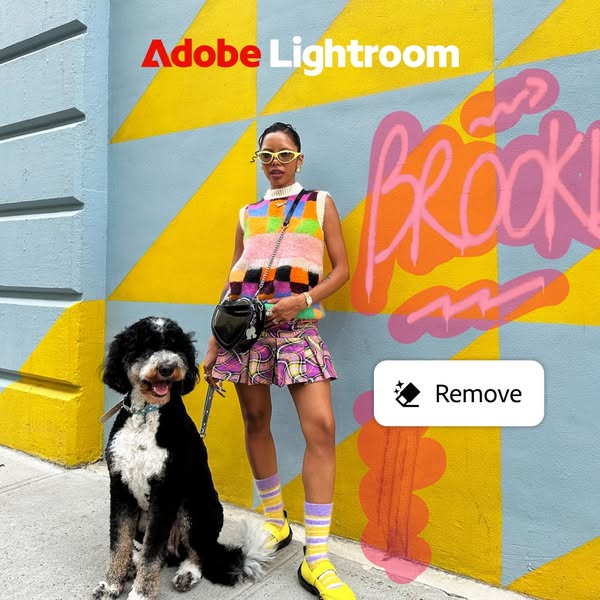
# Ad summary
This ad for Adobe Lightroom showcases the remove feature. The ad features a woman standing in front of a colorful wall with graffiti. The remove feature is highlighted with a button that says "Remove".
# Brand positioning
Adobe Lightroom is presented as a tool for creative expression and photo editing. The brand is positioned as a way to enhance and modify photos, as demonstrated by the remove feature. The brand aligns with a lifestyle of creativity and digital enhancement, offering tools that allow users to refine their images. Adobe Lightroom aims to occupy the space of a user-friendly yet powerful photo editing software, pushing against the complexity of traditional photo editing tools by offering intuitive features.
# Product
The advertised product is the "Remove" feature within Adobe Lightroom, a photo editing software. This feature allows users to remove unwanted elements from their photos, as demonstrated by the button in the image. The product is for anyone who wants to edit and enhance their photos, particularly those who want to remove distracting or unwanted objects. The ad highlights the ease of use of the feature, suggesting that it is simple and effective. The ad addresses the purchase barrier of complex photo editing by showcasing a user-friendly tool that can quickly improve photos.
# Visual style
The ad has a highly polished, studio-shot production quality. The visual motif is a colorful and modern aesthetic. The image treatment includes background removal and color grading. The typography integration is large and bold. The style is disruptive and high-design, which might impact scannability or stop power in feed.
# Hooks
Headline: None used
# Funnel stage
Middle of funnel (Consideration)
# Pain points
The pain point is the presence of unwanted elements in photos that detract from the overall image quality. The ad addresses this by showcasing the "Remove" feature, which allows users to easily eliminate these distractions.
# Value propositions
- The remove feature allows users to remove unwanted elements from their photos.
# Benefits
- Remove unwanted elements from photos
# Features
- Remove feature
# Call to action
None used.
# Social proof
- None used.
# Point of view
- Brand: The brand's point of view is present throughout the image, showcasing the Adobe Lightroom software and its remove feature.
# Storyline
- The ad opens with a woman standing in front of a colorful wall with graffiti. This is included to provide a visually interesting backdrop that can be enhanced with the Adobe Lightroom remove feature. The audience is experiencing this from the brand's perspective, showcasing the potential of the software.
- A button appears on the image that says "Remove". This is included to highlight the remove feature of Adobe Lightroom. The audience is experiencing this from the brand's perspective, showcasing the software's capabilities.
# Ad summary
This ad for Adobe Photoshop Lightroom demonstrates how to use the lens blur feature to edit photos. The ad shows a person editing photos on their computer, using the lens blur feature to blur the background and focus on the subject. The ad ends with a call to action to try Adobe Photoshop Lightroom now.
# Brand positioning
Adobe Photoshop Lightroom is presented as a user-friendly and powerful tool for photo editing. The brand aims to occupy the space of accessible professional-grade photo editing software, emphasizing ease of use and creative control. The brand aligns with a lifestyle of visual expression and artistic enhancement, appealing to both amateur and professional photographers. It pushes against the notion that professional photo editing requires complex and inaccessible software, positioning itself as a functional and empowering solution for anyone looking to enhance their images.
# Product
Adobe Photoshop Lightroom is a photo editing software that allows users to enhance and manipulate their images. The ad specifically highlights the "Lens Blur" feature, which allows users to blur the background of a photo while keeping the subject in focus. This feature is shown being used on various photos, demonstrating its versatility and ease of use. The product is for anyone who wants to improve their photos, whether they are amateur photographers or professionals. The ad addresses the purchase barrier of perceived complexity by showcasing the intuitive interface and simple steps required to achieve professional-looking results. The ad emphasizes that Lightroom is worth trying because it offers a quick and easy way to transform ordinary photos into visually stunning images.
# Visual style
The ad has a polished and modern aesthetic, blending real-life footage with screen recordings of the software interface. The editing style is quick, with cuts timed to the music. The production quality is high, giving it a commercial feel. The pacing is consistent, with a moderate BPM that keeps the ad engaging. The audio-visual sync is well-executed, with cuts and product actions timed to the music beats.
# Hooks
Spoken: 00:00–00:05: It's about to get real good.
Text overlay: 00:00–00:01: Adobe Photoshop Lightroom / 00:01–00:05: Lens Blur / 00:01–00:05: Apply / 00:01–00:05: Blur Amount / 00:02–00:05: Bokeh / 00:02–00:05: Boost
Visual: 00:00–00:05: A woman with long blonde hair and round sunglasses is standing in front of a wall with colorful lights. She is wearing a denim jacket and eating blue cotton candy. The camera is at eye level and slightly zoomed in. The lighting is bright and colorful, with pink and purple hues dominating. A screen recording of Adobe Photoshop Lightroom is overlaid, showing the "Lens Blur" feature being applied to the photo. The cursor is visible, clicking on different options within the feature.
# Funnel stage
Middle of funnel (Consideration)
# Pain points
The ad implies that ordinary photos may lack visual appeal and professional quality.
# Value propositions
- The Lens Blur feature allows you to easily enhance your photos by blurring the background and focusing on the subject.
# Benefits
- Enhance photos
- Blur the background
- Focus on the subject
# Features
- Lens Blur feature
# Call to action
Try now
# Social proof
- None used.
# Point of view
- Brand 100% – The entire ad is presented from the official voice of Adobe, showcasing the product's features and benefits.
# Storyline
- 00:00–00:05 00:00–00:05: A woman with sunglasses is eating cotton candy in front of a colorful wall. A screen recording of Adobe Photoshop Lightroom is overlaid, showing the "Lens Blur" feature being applied to the photo. This moment is intended to grab attention with a visually appealing scene and introduce the product's capability to enhance photos.
- 00:05–00:12 00:05–00:12: A woman in a blue jacket is sitting on a green wall in front of a building. The screen recording of Adobe Photoshop Lightroom is again overlaid, showing the "Lens Blur" feature being adjusted to blur the background. This continues to demonstrate the product's functionality and ease of use in different settings.
- 00:12–00:14 00:12–00:14: The Adobe logo appears with a "Try now" button. This is the final call to action, encouraging viewers to try the product themselves.
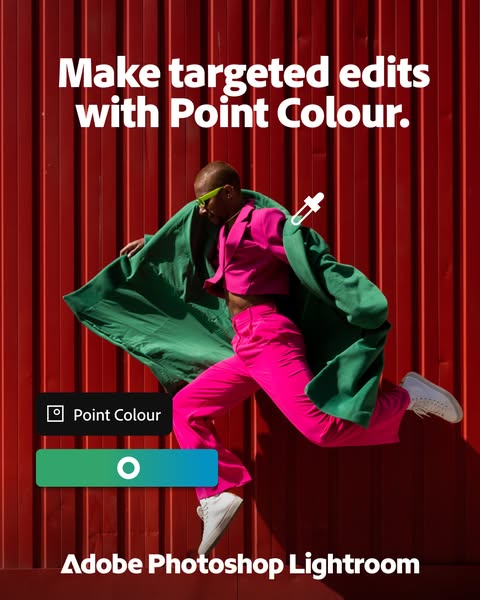
# Ad summary
This ad for Adobe Photoshop Lightroom highlights the 'Point Colour' feature, showing a person in bright clothing against a red background, with the app interface displayed.
# Brand positioning
Adobe Photoshop Lightroom is presented as a tool for precise and targeted photo editing. The brand is positioned for users who want to have control over specific color elements in their images. The ad emphasizes functionality and precision, appealing to users who value detailed editing capabilities. The brand aims to occupy the space of professional-grade editing software, offering tools that allow for targeted adjustments and creative expression.
# Product
The product being advertised is the 'Point Colour' feature within Adobe Photoshop Lightroom, a tool designed for targeted color editing in photos. It allows users to make specific color adjustments, as demonstrated by the color selection interface shown in the ad. The feature is for users who want precise control over color elements in their images. The ad highlights the ability to make targeted edits, suggesting that users can easily adjust specific colors without affecting the rest of the image. The ad aims to show that this feature is worth trying for those who want to enhance their photos with detailed color adjustments.
# Visual style
The ad has a modern and vibrant visual style, with a focus on bold colors and clean design. The production quality appears to be high, with professional photography and graphic elements. The image treatment includes color grading to enhance the vibrancy of the colors. The typography is clean and legible, and the overall style is designed to be eye-catching and engaging.
# Hooks
Headline: Make targeted edits with Point Colour.
# Funnel stage
Middle of funnel (Consideration)
# Pain points
The ad addresses the pain point of needing precise color control in photo editing, where users may struggle to adjust specific colors without affecting the rest of the image.
# Value propositions
- The 'Point Colour' feature allows users to make targeted edits, providing precise control over color elements in their images.
# Benefits
- Make targeted edits
# Features
- Point Colour
# Call to action
None used.
# Social proof
- None used.
# Point of view
- Brand: The text "Make targeted edits with Point Colour" is the brand communicating the key benefit of the advertised feature.
- Brand: The Adobe Photoshop Lightroom logo at the bottom of the image is the brand reinforcing its identity and product association.
# Storyline
- The ad opens with the text "Make targeted edits with Point Colour," immediately introducing the key benefit of the advertised feature. The brand is telling the audience what they can achieve with the product.
- The visual of a person in brightly colored clothing against a red background demonstrates the impact of targeted color edits. The brand is showing the audience a real-world example of how the feature can be used to enhance an image.
- The inclusion of the Adobe Photoshop Lightroom logo reinforces the brand identity and connects the feature to the broader software suite. The brand is reminding the audience of the product's origin and credibility.
# Ad summary
This ad demonstrates how to use the lens blur feature in Adobe Photoshop Lightroom. The ad shows a woman at a carnival eating cotton candy. The lens blur feature is used to blur the background of the image, making the woman and cotton candy stand out.
# Brand positioning
Adobe Photoshop Lightroom is presented as a user-friendly tool for enhancing photos. The brand aims to occupy the space of accessible professional-grade photo editing, emphasizing ease of use and creative control. The brand aligns with a lifestyle of visual expression and artistic exploration, pushing against the norm of complex, intimidating photo editing software. The brand positioning is functional, focusing on simplicity and performance, while also appealing to the emotional desire for creative empowerment.
# Product
The featured product is the Lens Blur feature within Adobe Photoshop Lightroom, a tool designed to enhance photos by blurring the background. This feature allows users to adjust the blur amount and bokeh effects, creating a professional-looking depth of field. The product is for anyone looking to add a creative touch to their photos, making subjects stand out. The ad highlights the ease of use and the ability to achieve a high-quality, artistic effect with just a few adjustments. The ad addresses the barrier of complex photo editing by showcasing a simple, intuitive interface.
# Visual style
The ad has a polished yet accessible aesthetic, blending UGC-style footage with a clean, professional interface. The editing style includes quick cuts to maintain a fast pace. The production quality is a hybrid, combining natural, handheld shots with clear screen recordings. The pacing is consistent, with cuts timed to the music. The audio-visual sync is evident in the transitions and product actions, enhancing the overall impact.
# Hooks
Spoken: 00:04–00:06: [Upbeat] It's about to get real good!
Text overlay: 00:04–00:06: Try now
Visual: 00:04–00:06: The Adobe logo appears in red on a white background. The text "Adobe Photoshop Lightroom" is displayed below, followed by a "Try now" button. The camera is static, focusing on the logo and text. The lighting is bright and even.
# Funnel stage
Middle of funnel (Consideration)
# Pain points
The ad addresses the pain point of complex photo editing software by showcasing a simple, intuitive interface. The visual of the Lightroom interface implies that the software is easy to navigate and use.
# Value propositions
- Easy to use
- High-quality artistic effect
- Simple, intuitive interface
# Benefits
- Enhance photos
- Create professional-looking depth of field
- Make subjects stand out
# Features
- Lens Blur feature
- Adjustable blur amount
- Bokeh effects
# Call to action
Try now
# Social proof
- None used.
# Point of view
- Brand 80% – The brand's official voice is used to demonstrate the product and provide a call to action.
- Customer 20% – A customer is shown enjoying the product, providing a relatable visual.
# Storyline
- 00:00–00:02 00:00–00:02: The video opens with a shot of a woman eating cotton candy at a carnival. The focus is on the woman and the cotton candy, with the background blurred. The message is to showcase a visually appealing scene that can be enhanced with the product. The perspective is from an observer, capturing the moment. The tone is playful and vibrant, reflecting the carnival atmosphere. This moment sets the stage for demonstrating how the product can enhance everyday photos.
- 00:02–00:03 00:02–00:03: The screen transitions to show the Adobe Photoshop Lightroom interface, specifically the Lens Blur feature. The message is to demonstrate the product's functionality and ease of use. The perspective shifts to the user's point of view, showing how to adjust the blur amount and bokeh effects. The tone is informative and practical, guiding the viewer through the editing process. This moment builds on the previous shot by showing how to achieve the blurred background effect.
- 00:03–00:04 00:03–00:04: The video returns to the original shot of the woman eating cotton candy, now with the enhanced blurred background. The message is to showcase the final result and the impact of the product. The perspective is again from an observer, highlighting the visual improvement. The tone is celebratory and satisfying, emphasizing the creative potential of the product. This moment provides a before-and-after comparison, reinforcing the product's value.
- 00:04–00:06 00:04–00:06: The Adobe Photoshop Lightroom logo appears, followed by a call to action to "Try now." The message is to reinforce brand recognition and encourage immediate action. The perspective is from the brand, directly addressing the viewer. The tone is direct and persuasive, aiming to convert interest into action. This moment concludes the ad with a clear next step for the viewer.
# Ad summary
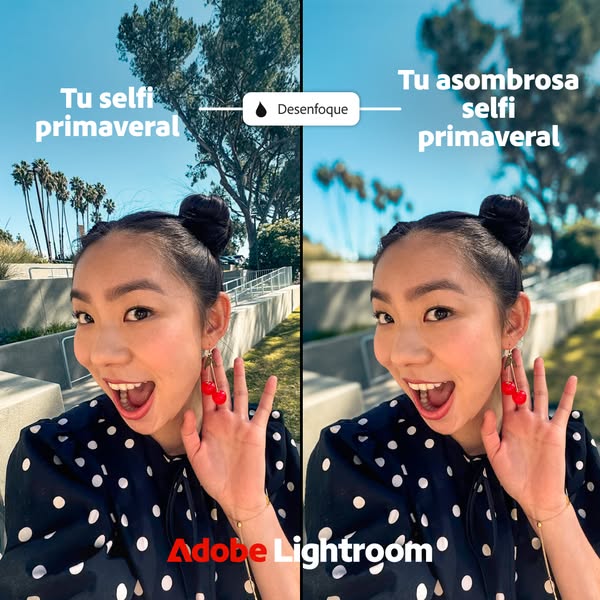
An ad for Adobe Lightroom featuring a split screen 'before/after' of a selfie with a filter applied.
# Brand positioning
Adobe Lightroom is presented as a user-friendly tool for enhancing photos. The brand focuses on making advanced photo editing techniques accessible to everyday users, as demonstrated by the straightforward 'before and after' format, showing the impact of a single filter. By showcasing the immediate improvement in a selfie, Adobe Lightroom positions itself as a practical solution for achieving professional-looking results with minimal effort, appealing to users who want to enhance their personal content.
# Product
The Adobe Lightroom mobile app is showcased as a tool for quick photo enhancements. The ad demonstrates the 'Desfoque' or blur feature, which softens the background of a selfie. The ad is aimed at selfie-takers who want to improve the quality of their photos by applying simple filters. The visual comparison addresses the barrier of understanding complex editing techniques, presenting the blur feature as an easy way to achieve a professional look. The product is presented as a way to make an 'amazing spring selfie'.
# Visual style
The ad presents a before-and-after comparison using a split-screen layout. The production quality appears to be high, with clear lighting and a focus on showcasing the difference between the unedited and edited selfie. The typography is clean and modern, while the color grading is natural. The visual style contrasts the platform's typical content by providing a clear demonstration of a product feature.
# Hooks
Headline: Tu asombrosa selfie primaveral
# Funnel stage
Middle of funnel (Consideration)
# Pain points
The ad implies that users want to make their selfies more impressive.
# Value propositions
- Shows how the app can be used to make selfie images more amazing.
# Benefits
- Amazing selfie
# Features
- Desfoque (blur)
# Call to action
None used.
# Social proof
- None used.
# Point of view
- Brand: The image as a whole showcases the app's capabilities and ease of use.
- Customer: The woman in the selfie is showcasing how the product can be used to make selfie images.
- External source: The white rounded rectangle with the word 'Desfoque' is an indication of a user interface.
# Storyline
- The image is split into two halves, showing a before-and-after transformation. The left side displays the original selfie with the focus on the background. This is included to show the starting point and what needs improvement. The audience experiences this from the perspective of someone viewing their own unedited photo and recognizing the need for enhancement.
- A 'Desfoque' (blur) filter is applied using Adobe Lightroom, creating a softened background in the right half of the image. This illustrates the improvement achievable with the app's blur feature. The story here is told from the perspective of the brand demonstrating its product's capability.
- The result is a selfie with a more appealing background, emphasizing the subject. This showcases the value of the app in making selfies look more professional. The audience sees the transformation from the perspective of someone who has successfully enhanced their photo, achieving a more polished look.
# Ad summary
This ad features a creator sharing her top two favorite features on Adobe Lightroom. The first feature is Assisted Culling, which helps narrow down images based on preferences like eyes open and in focus. The second feature is the Removal Tool, which is powered by Generative AI and allows users to highlight distractions in the background of an image and replace them with seamless blends.
# Brand positioning
Adobe Lightroom is presented as a powerful and time-saving tool for photographers, particularly those dealing with large volumes of images. The brand aims to occupy the space of a professional-grade yet user-friendly photo editing software, aligning with values of efficiency, precision, and creative control. It pushes against the norm of manual, time-consuming photo selection and editing processes by offering AI-powered features that streamline workflow. The brand positioning is both functional (performance, efficiency) and emotional (empowerment, creative freedom).
# Product
Adobe Lightroom is a photo editing software designed for photographers and creatives. The ad highlights two key features: Assisted Culling and the Removal Tool. Assisted Culling helps users narrow down large sets of images by filtering based on preferences like "eyes open" and "in focus," saving time and effort. The Removal Tool, powered by Generative AI, allows users to highlight and remove distracting elements in the background of images, replacing them seamlessly. These features address the pain points of time-consuming manual selection and the presence of unwanted distractions in photos, making Lightroom a valuable tool for streamlining the editing process and enhancing image quality. The ad emphasizes that these features can transform unusable images into favorites, making the product worth trying or buying.
# Visual style
The ad has a UGC feel, with a mix of direct-to-camera shots and screen recordings. The editing style includes quick cuts and smooth transitions. The production quality is a hybrid, combining casual, personal footage with polished software demonstrations. The pacing is consistent, with cuts timed to the voiceover. The overall aesthetic is natural and relatable, aiming to connect with the audience on a personal level.
# Hooks
Spoken: Hi, I'm Bushwacked. I'm going to share my top two features on Adobe Lightroom.
Text overlay: Hi, I'm Bushwacked / I'm going to share my top two features on Adobe Lightroom
Visual: 00:00–00:04: A medium close-up shot of a fair-skinned woman with long brown hair and bangs, wearing a striped sweater and a necklace. She is centered in the frame, speaking directly to the camera. The background is a dimly lit room with a coat rack and a door visible.
# Funnel stage
Middle of funnel (Consideration)
# Pain points
The ad addresses the pain point of time-consuming manual photo selection and editing, particularly when dealing with large volumes of images. "I have to cull through roughly 10,000 images for a wedding weekend."
# Value propositions
- Assisted Culling saves time by narrowing images based on preferences like "Eyes Open" and "In Focus."
- The Removal Tool, powered by Generative AI, allows users to highlight and remove distracting elements in the background of images, replacing them seamlessly.
- This tool has taken some images that I deemed unusable and made them some of my favorites.
# Benefits
- Saves time
- Narrows images based on preferences
- Highlights and removes distractions
- Seamlessly blends into the background
# Features
- Assisted Culling
- Removal Tool
- Generative AI
# Call to action
You can download Lightroom and try these features today.
# Social proof
- "I feel like I use it in 50% of my editing process with weddings" – Female 1 (Creator)
# Point of view
- Customer 100% – The entire video is told from the perspective of a photographer and user of Adobe Lightroom, sharing her personal experience and favorite features.
# Storyline
- 00:00–00:03 The creator introduces herself and states that she will share her top two features on Adobe Lightroom.
- 00:03–00:08 The creator introduces the first feature, Assisted Culling, and explains that she has to cull through roughly 10,000 images for a wedding weekend.
- 00:08–00:14 She explains that Assisted Culling saves her time by narrowing the images based on her preferences, such as "eyes open" and "in focus."
- 00:14–00:17 She notes that this is a massive time saver for large group shots where she needs to zoom in and check person by person.
- 00:17–00:23 The creator shows her selection process from a recent shoot, showing the before and after culling.
- 00:23–00:28 She explains that the software highlights the choices, allowing her to flag them and streamline her editing.
- 00:28–00:32 The creator introduces her next favorite feature, the Removal Tool, which is powered by Generative AI.
- 00:32–00:35 She explains that there is almost always something distracting in the background of an image.
- 00:35–00:42 She states that the Removal Tool allows her to highlight those distractions and gives her three different options to replace them while seamlessly blending into the background.
- 00:42–00:47 The creator explains that this tool has taken some images that she deemed unusable and made them some of her favorites.
- 00:47–00:51 She says that she uses the tool in 50% of her editing process with weddings.
- 00:51–00:53 The creator encourages viewers to download Lightroom and try these features today.
# Ad summary
This ad for Adobe Lightroom demonstrates how to remove unwanted objects from a photo using the app's object removal tool.
# Brand positioning
Adobe Lightroom is presented as a user-friendly photo editing software that allows users to easily enhance their photos. The brand is positioned as a tool for removing unwanted objects from photos, making it a practical solution for improving photo quality. The ad focuses on the functional aspect of the software, highlighting its simplicity and effectiveness in achieving desired results.
# Product
Adobe Lightroom's object removal tool is a feature within the photo editing software that allows users to remove unwanted objects from their photos. The tool is designed for anyone who wants to improve the quality of their photos by eliminating distractions or imperfections. The ad demonstrates how the tool works by removing a person from a picnic photo, showcasing its ability to seamlessly blend the background and create a cleaner image. The tool addresses the common frustration of having unwanted elements in photos and offers a simple solution for achieving a more polished and professional look.
# Visual style
The ad has a clean and polished aesthetic, with bright natural lighting and smooth transitions. The editing style is simple and straightforward, focusing on showcasing the product's functionality. The pacing is consistent, with each shot timed to highlight the key steps in the object removal process.
# Hooks
Text overlay: 00:00–00:09: Tu foto de picnic
Visual: 00:00–00:02: A low-angle shot of a woman lying on a colorful blanket in a park. She is wearing pink sunglasses, a floral top, and denim overalls. A man is lying behind her, wearing sunglasses and a white t-shirt. The background features green grass, trees, and a blue sky.
# Funnel stage
Middle of funnel (Consideration)
# Pain points
The ad addresses the frustration of having unwanted elements in photos that distract from the main subject.
# Value propositions
- Easily remove unwanted objects from your photos with Adobe Lightroom's object removal tool.
# Benefits
- Remove unwanted objects from photos
- Cleaner and more focused images
# Features
- Object removal tool
# Call to action
Más información (More information)
# Social proof
- None used.
# Point of view
- Brand 100% – The ad is presented from the official voice of the brand, showcasing the product's features and benefits.
# Storyline
- 00:00–00:09 00:00–00:09: The ad opens with a picnic photo featuring a woman in the foreground and a man in the background. The text overlay "Tu foto de picnic" (Your picnic photo) appears, setting the scene. The Adobe Lightroom app interface is then shown, with the object removal tool being used to remove the man from the photo. This demonstrates the tool's functionality and ease of use.
- 00:09–00:12 00:09–00:12: The text overlay changes to "Tu foto de picnic sin los extras" (Your picnic photo without the extras), highlighting the benefit of the object removal tool. The final result is shown, with the man completely removed from the photo, creating a cleaner and more focused image.
- 00:12–00:14 00:12–00:14: The Adobe Lightroom logo appears, reinforcing the brand and product being advertised.
# Ad summary
This ad for Adobe Lightroom features a woman showing off her spring selfie. The ad shows how to use the app to adjust the photo.
# Brand positioning
Adobe Lightroom is presented as a user-friendly photo editing app that allows users to enhance their photos with ease. The brand aims to occupy the space of accessible, high-quality photo editing for everyday users. The brand promotes simplicity and creativity, aligning with a lifestyle of sharing and expressing oneself through visually appealing content. The brand positioning is functional, focusing on the simplicity and performance of the app in enhancing photos.
# Product
Adobe Lightroom is a photo editing app that allows users to adjust and enhance their photos. The ad shows the app's ability to adjust presets and blur the background of photos. The app is for anyone who wants to improve their photos with easy-to-use tools. The ad addresses the purchase barrier of complexity by showing how simple it is to use the app.
# Visual style
The ad has a polished, commercial feel with natural lighting. The editing style includes quick cuts and smooth transitions. The pacing is consistent. The audio and visual elements are synced, with sound effects timed to the appearance of text overlays.
# Hooks
Spoken: [Singing] Tu selfie primaveral
Text overlay: Tu selfie primaveral
Visual: 00:00–00:02: A woman is outside in a park-like setting with palm trees and green grass. She is holding the camera in selfie mode, smiling, and waving. She is wearing cherry earrings and a black and white polka dot top. The camera is handheld and slightly shaky. The lighting is natural and bright.
# Funnel stage
Middle of funnel (Consideration)
# Pain points
The ad implies that users may be frustrated with the quality of their selfies and want to enhance them. "Tu asombrosa selfie primaveral"
# Value propositions
- Enhance your photos with easy-to-use tools
- Create visually appealing content
# Benefits
- Enhance photos
- Adjust presets
- Blur the background
# Features
- Adjust presets
- Blur the background
# Call to action
Más información
# Social proof
- None used.
# Point of view
- Customer 100% – The ad is presented from the perspective of a user showing how to use the app.
# Storyline
- 00:00–00:02 00:00–00:02: A woman is taking a selfie outside. The message is to show a spring selfie. The perspective is from the woman taking the selfie. The tone is cheerful and inviting.
- 00:02–00:05 00:02–00:05: A text overlay appears showing the option to adjust presets. The message is to show how to adjust presets in the app. The perspective is from the app user. The tone is informative.
- 00:05–00:09 00:05–00:09: A text overlay appears showing the option to blur the background. The message is to show how to blur the background in the app. The perspective is from the app user. The tone is informative.
- 00:09–00:12 00:09–00:12: A text overlay appears showing the final result of the edited selfie. The message is to show the enhanced selfie. The perspective is from the app user. The tone is celebratory.

# Ad summary
This ad for Adobe Lightroom uses a split screen to show the difference between an unedited photo and one edited with the app. The ad targets people who want to make their photos look their best.
# Brand positioning
Adobe Lightroom is presented as a tool for enhancing photos and making them look their best. The brand is positioned as a way to take your photos to the next level, allowing you to capture the full splendor of your day. The brand aims to occupy the space in the consumer's mind as a user-friendly photo editing software that can be used by anyone.
# Product
Adobe Lightroom is a photo editing software that allows users to enhance their photos. The ad shows a split screen of a photo before and after being edited with the app. The product is for anyone who wants to make their photos look their best. The ad highlights the ability to use preset adjustments to quickly and easily improve photos. The ad addresses the purchase barrier of photo editing being too difficult or time-consuming by showing how easy it is to use the app.
# Visual style
The ad has a clean and modern visual style. The split screen is a common visual motif in ads, and the use of bright colors and natural lighting gives the ad a positive and uplifting feel. The typography is simple and easy to read.
# Hooks
Headline: None used
# Funnel stage
Middle of funnel (Consideration)
# Pain points
None used.
# Value propositions
- Use preset adjustments to quickly and easily improve your photos.
# Benefits
- Tu día perfecto
- Tu día perfecto en todo su esplendor
# Features
- Ajustes preestablecidos
# Call to action
None used.
# Social proof
- None used.
# Point of view
- Brand: The brand's point of view is present throughout the ad, as it is promoting its product and showing the benefits of using it.
# Storyline
- The ad opens with a split screen of a photo, with the left side showing the unedited version and the right side showing the edited version. This is intended to show the viewer the difference that Adobe Lightroom can make in their photos, from the brand's perspective.
- The ad then shows text that says "Tu día perfecto" and "Tu día perfecto en todo su esplendor" on either side of the split screen. This is intended to show the viewer that Adobe Lightroom can help them capture the full splendor of their day, from the brand's perspective.
- The ad also shows a button that says "Ajustes preestablecidos". This is intended to show the viewer that Adobe Lightroom has preset adjustments that they can use to quickly and easily improve their photos, from the brand's perspective.
# Ad summary
This ad demonstrates how to use Adobe Lightroom to edit out unwanted things in a photo. The ad shows a woman in a park taking a photo of her dog, and then using the app to remove a person from the background.
# Brand positioning
Adobe Lightroom is presented as a user-friendly tool for anyone who wants to enhance and refine their photos with professional-quality edits. The ad focuses on the practical benefits of the software, positioning it as an accessible solution for achieving clean and polished images, even for everyday snapshots. By showcasing a common scenario – wanting a perfect photo without distractions – Adobe Lightroom aligns with the needs of casual users who want high-impact edits without complex processes. This approach makes the brand relatable and positions it as a go-to for quick, effective photo enhancements, bridging the gap between amateur photography and professional results.
# Product
Adobe Lightroom is presented as a user-friendly photo editing app that allows users to easily remove unwanted objects from their photos. The ad demonstrates the “remove” tool. The product is designed for anyone looking to easily clean up their images and achieve a polished final result. The main USP highlighted is its ability to eliminate distractions and enhance focus in photos, making it a valuable tool for everyday photo editing needs. The ad emphasizes how easy it is to use, addressing the purchase barrier of complicated photo editing software. The ad tells the viewer that this product is worth trying or buying for its ability to transform everyday photos into visually appealing, distraction-free images.
# Visual style
The ad has a clean and straightforward aesthetic, emphasizing clarity and ease of understanding. The editing style consists of static shots and smooth transitions, making it easy for viewers to follow the demo. The production quality is polished, presenting the app as professional and reliable. The pacing is consistent, with each shot held long enough to clearly demonstrate the product’s feature. There are no cuts or product actions timed to music beats or voiceover lines.
# Hooks
Text overlay: 00:00–00:02 Tu amigo peludo
Visual: 00:00–00:02 A close-up shot of a small, shaggy grey and white dog with a black harness standing on a green lawn. Behind the dog, partially out of focus, is the rear of a large brown poodle and some trees. The camera is stationary and at eye level with the dog, capturing a clear view of its face and upper body.
# Funnel stage
Middle of funnel (Consideration)
# Pain points
The ad addresses the frustration of having unwanted elements in photos that detract from the main subject.
# Value propositions
- The ability to remove unwanted objects from photos is a valuable tool for everyday photo editing.
- Turn everyday photos into visually appealing, distraction-free images.
# Benefits
- Easily remove unwanted objects from photos
- Achieve a polished final result
- Eliminate distractions
- Enhance focus
# Features
- User-friendly
- Photo editing app
- “Remove” tool
# Call to action
Probar ahora
# Point of view
- Brand 100% – The ad is communicated through on-screen text, with no other POVs.
# Storyline
- 00:00–00:02 The ad begins by introducing a photo of a small, shaggy dog standing on a lawn, suggesting a real-life scenario where the user is taking a photo. The intention is to present an authentic, relatable situation.
- 00:02–00:07 Next, the ad shows how Adobe Lightroom can be used to remove an unwanted person from the background of the photo. This demonstrates the product’s practical application in a clear, before-and-after format.
- 00:07–00:14 The ad concludes by reinforcing the ease of use and effectiveness of Adobe Lightroom, emphasizing that it is a tool designed to enhance photos quickly and efficiently. The tone is informative and straightforward, aiming to show rather than tell the product’s value.
# Ad summary
This ad promotes Adobe Lightroom. The ad starts with a close up of a smiling couple with text overlay saying "Tu día perfecto en todo su esplendor." The ad cuts to a screen recording of the Adobe Lightroom app. The ad ends with the Adobe Lightroom logo.
# Brand positioning
Adobe Lightroom is presented as a tool to make photos more perfect. The brand is functional, by offering preset settings to make photos better. The ad focuses on a perfect moment.
# Product
Adobe Lightroom is a photo editing software for mobile phones, tablets, and desktop computers. The ad features the app on a smartphone being used to apply preset settings to a photo. The app claims to make the user's day more perfect.
# Visual style
The ad's aesthetic is bright, clean, and modern. The editing style uses quick cuts to transition between the couple and the Lightroom app. The production quality is polished and professional. The pacing is fast, with cuts timed to the music. The cuts are not timed to the beat of the music, but still move quickly.
# Hooks
Spoken: 00:00–00:11 Tu día perfecto en todo su esplendor.
Text overlay: 00:00–00:03 Tu día perfecto
Visual: 00:00–00:02 The shot is a low-angle close-up of a woman and a man, both smiling and touching heads. The woman is on the left with short dark hair, wearing a floral top and denim overalls. The man is on the right with blonde hair and a striped shirt. Yellow flowers are visible in the foreground and background, and the sky is blue.
# Funnel stage
Top of funnel (Awareness)
# Pain points
None used.
# Value propositions
- Using presets allows the user to make their photos more perfect.
# Benefits
- Tu día perfecto en todo su esplendor
# Features
- Ajustes preestablecidos
# Call to action
Más información
# Social proof
- None used.
# Point of view
- Brand 100% – The ad is told from the perspective of the brand by showcasing its app.
# Storyline
- 00:00–00:11 The ad opens with a smiling couple in a field of flowers, which conveys a sense of love and happiness.
- 00:02–00:09 The screen shows an application to edit photos, which makes a correlation that this is the Adobe Lightroom app. The intention is to show the user interface of the app.
- 00:11–00:15 The ad ends with the Adobe Lightroom logo, which reinforces brand recognition.
# Ad summary
This ad for Adobe Lightroom features a woman outside on a sunny day. She is smiling and looking up at the sky. The ad shows how to use the app to put the focus on her smile.
# Brand positioning
Adobe Lightroom is presented as a user-friendly photo editing app that empowers users to enhance their photos with ease. The brand aims to occupy a space in the consumer's mind as a go-to solution for quick and effective photo enhancements, particularly for mobile users. The brand aligns with a lifestyle of creativity and self-expression, promoting the idea that anyone can achieve professional-looking results with the right tools. The brand positioning is functional, focusing on the simplicity and performance of the app in making photos stand out.
# Product
Adobe Lightroom is presented as a mobile app designed for quick and easy photo editing. The ad focuses on the app's ability to automatically select and enhance specific elements within a photo, such as the subject or the sky. The app is for anyone who wants to make their photos stand out with minimal effort. The ad highlights the app's user-friendly interface and automatic enhancement features, making it accessible to users of all skill levels. The ad shows the app being used outdoors on a sunny day, suggesting it is ideal for enhancing photos taken in natural light. The ad addresses the purchase barrier of complexity by showcasing the app's simplicity and ease of use.
# Visual style
The ad has a polished and clean aesthetic, with bright natural lighting and smooth transitions. The editing style is simple and straightforward, focusing on showcasing the app's features and ease of use. The production quality is high, giving the ad a professional and trustworthy feel. The pacing is consistent, with each shot held long enough to convey its message clearly. The audio-visual sync is smooth, with the music and sound effects complementing the visuals.
# Hooks
Spoken: 00:00–00:02 Tu bonita sonrisa
Text overlay: 00:00–00:02 Tu bonita sonrisa
Visual: 00:00–00:02 A woman with short dark hair, wearing a white floral top and hoop earrings, smiles and looks up at the sky. The background is a clear blue sky with scattered clouds. The setting is outdoors, likely in a park or garden. The camera is positioned at a low angle, looking up at the woman. The lighting is natural and bright, highlighting the woman's features and the vibrant colors of her clothing.
# Funnel stage
Middle of funnel (Consideration)
# Pain points
The ad addresses the frustration of photos not capturing the true beauty of a moment, particularly when it comes to highlighting key features like a smile. "Tu bonita sonrisa" (Your beautiful smile) implies that the app will help make the smile stand out.
# Value propositions
- The app's automatic enhancement features make it easy to create professional-looking photos with minimal effort.
# Benefits
- Make your smile the center of attention
# Features
- Acciones rápidas (Quick Actions)
- Automático (Automatic)
- Sujeto (Subject)
- Cielo (Sky)
# Call to action
Más información (More information)
# Social proof
- None used.
# Point of view
- Customer 80% – The ad is primarily told from the perspective of a customer, showcasing the ease and effectiveness of the app through a real-life scenario.
- Brand 20% – The brand's perspective is communicated through the logo and call to action, reinforcing its identity and promoting its product.
# Storyline
- 00:00–00:02 00:00–00:02 The ad opens with a shot of a woman smiling and looking up at the sky. The message is to capture the viewer's attention with a positive and engaging image. The perspective is from a low angle, looking up at the woman, creating a sense of admiration and positivity. The tone is bright and cheerful, setting a positive mood for the ad.
- 00:02–00:09 00:02–00:09 The screen transitions to show the Adobe Lightroom app interface, demonstrating how to use the app to select and enhance specific elements in the photo. The message is to showcase the app's user-friendly features and ease of use. The perspective is from the app's user interface, guiding the viewer through the editing process. The tone is informative and instructional, highlighting the app's capabilities.
- 00:09–00:11 00:09–00:11 The ad returns to the enhanced photo of the woman, now with the focus on her smile. The message is to demonstrate the app's ability to make photos stand out and capture attention. The perspective is from the viewer, showcasing the final result of the editing process. The tone is satisfying and rewarding, emphasizing the positive outcome of using the app.
- 00:11–00:14 00:11–00:14 The ad concludes with the Adobe Lightroom logo and a call to action to learn more. The message is to reinforce the brand identity and encourage viewers to explore the app further. The perspective is from the brand, promoting its product and inviting engagement. The tone is professional and inviting, encouraging viewers to take the next step.
# Ad summary
An influencer creates content about her races. She tells viewers that she uses Lightroom on mobile to edit the photos she takes while running, so she can update her social media followers. She encourages viewers to download Lightroom on Mobile.
# Brand positioning
Adobe Lightroom on mobile is presented as a user-friendly, accessible tool that empowers content creators, especially those on-the-go like marathon runners, to enhance their photos and maintain an active social media presence. The brand positions itself as a solution to the common problem of imperfect selfies, offering easy-to-use features for quick and effective photo editing. Lightroom aligns with a lifestyle of capturing and sharing experiences in real-time, particularly for individuals who value visual content and social media engagement. The brand avoids direct comparison or aggressive marketing tactics, instead opting for a functional and practical approach that shows how it makes creating and sharing content on social media more accessible for users.
# Product
Adobe Lightroom on Mobile is a photo editing app designed for quick and easy image enhancement directly on a mobile device. It targets content creators and social media users who need to tweak their photos on the go. The app makes it easy to tweak selfies so that I can bring myself back into the spotlight and keep my social media community updated even at the start of the race. The app addresses the common problem of imperfect race day selfies, by offering features that allow users to bring myself back into the spotlight. The ad encourages viewers to download Lightroom on Mobile today.
# Visual style
The ad has a UGC feel, with a casual tone and selfie-style camera angles. The production quality is relatively high, with clear visuals and smooth transitions, but the overall aesthetic remains natural and unpolished. The pacing is consistent, with a steady rhythm that aligns with the speaker's conversational tone. The visual style supports the intended audience of on-the-go content creators.
# Hooks
Spoken: Hi, my name is Preethi and I'm a content creator and marathon runner based in New York City.
Text overlay: Let's edit a / Race Day Selfie / together / #adobepartner
Visual: 00:00–00:02: A wide, selfie-style shot of a smiling dark-skinned woman with long braids and a bright pink running outfit that says, "PREETHI". She stands outside with green bushes behind her. In the distance is the lower half of a gray metal suspension bridge. It is a sunny day. / 00:02–00:03: The shot zooms out to reveal the Adobe Lightroom Mobile editing screen in the upper right hand corner of the frame. The woman is still holding the camera in selfie mode.
# Funnel stage
Top of funnel (Awareness)
# Pain points
My race day selfies are imperfect.
# Value propositions
- Capture and share special moments on the go
- Improve imperfect selfies so that you can bring yourself back into the spotlight
# Benefits
- Capture special moments on the go
- Tweak your selfies
- Bring myself back into the spotlight
- Keep my social media community updated
# Features
- Edit your photos
- Share photos to social media
# Call to action
Download Lightroom on Mobile today
# Social proof
- As a content creator running these races, being able to capture the special moments on the go is so important to me.
# Point of view
- Customer 100% – The entire ad is told from the perspective of a content creator and marathon runner using and reviewing the product.
# Storyline
- 00:00–00:03 A woman standing outside in running gear introduces herself as Preethi, a content creator and marathon runner.
- 00:03–00:12 She notes that capturing special moments on the go is important to her but that her race day selfies are often imperfect.
- 00:12–00:15 She states that she loves using Lightroom on Mobile.
- 00:15–00:26 She claims that the app makes it easy to tweak her selfies so that she can bring myself back into the spotlight, and keep her social media community updated, even at the start of a race.
- 00:26–00:30 She directs the viewer to download Lightroom on Mobile today.
# Ad summary
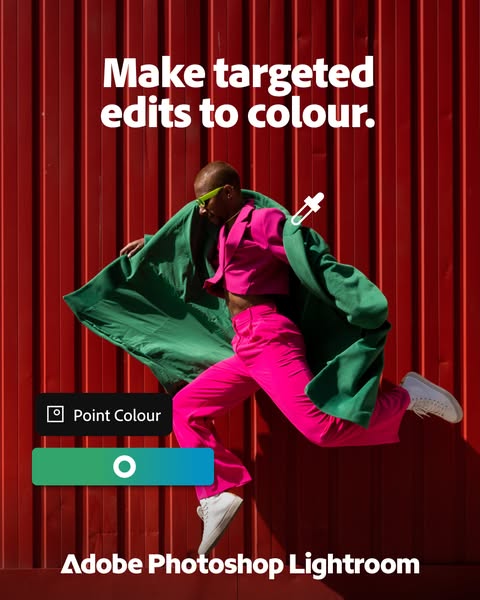
This ad for Adobe Photoshop Lightroom highlights the 'Point Colour' feature, which allows users to make targeted edits to color in their photos. The ad features a person in bright clothing jumping in front of a red wall, demonstrating the ability to isolate and adjust specific colors.
# Brand positioning
Adobe Photoshop Lightroom is presented as a tool for precise and targeted photo editing, specifically focusing on color manipulation. The brand positions itself as empowering users to have granular control over their images, allowing for creative expression and professional-level adjustments. The ad emphasizes functionality and precision, appealing to users who want to refine their photos with accuracy.
# Product
The advertised product is the 'Point Colour' feature within Adobe Photoshop Lightroom, which enables users to make targeted edits to specific colors in their photos. This feature allows for precise adjustments, enhancing or altering colors with accuracy. The ad highlights the ability to isolate and manipulate individual colors, providing users with granular control over their images. The product is for anyone looking to refine their photos with professional-level color editing capabilities.
# Visual style
The ad has a vibrant and modern visual style, with a focus on bold colors and dynamic composition. The production quality is high, with professional lighting and a clean aesthetic. The image treatment enhances the colors, making them pop and drawing attention to the product's color editing capabilities. The typography is clean and legible, complementing the overall design.
# Hooks
Headline: Make targeted edits to colour.
# Funnel stage
Middle of funnel (Consideration)
# Pain points
None used.
# Value propositions
- The 'Point Colour' feature allows users to make targeted edits to specific colors in their photos, providing granular control and professional-level color editing capabilities.
# Benefits
- Make targeted edits to colour.
# Features
- Point Colour
# Call to action
None used.
# Social proof
- None used.
# Point of view
- Brand: The brand is presenting the features and benefits of its product, Adobe Photoshop Lightroom, and its 'Point Colour' feature. This is evident through the headline, visual demonstration, and inclusion of the product interface element.
# Storyline
- The ad opens with the headline 'Make targeted edits to colour,' immediately establishing the core value proposition of the product. The brand is telling the audience that they can have precise control over color in their photos.
- The visual of a person in brightly colored clothing jumping in front of a red wall demonstrates the 'Point Colour' feature in action. The brand is showing how the feature can isolate and enhance specific colors, making the image more vibrant and visually appealing.
- The inclusion of the 'Point Colour' interface element reinforces the product's functionality and ease of use. The brand is highlighting the user-friendly nature of the feature, making it accessible to a wide range of users.
- The ad concludes with the Adobe Photoshop Lightroom logo, solidifying brand recognition and association with professional photo editing. The brand is reminding the audience of its reputation and expertise in the field.
How Other Technology Brands Advertise on Meta
Peer brands in Motion's library — click any brand to see their creative strategy, live ads, and AI breakdowns.